
InfoEmu Team
Your AI agent can run your web presence
Your AI agent can run your web presence
Most hosting platforms were designed for humans clicking dashboards. InfoEmu was built the other way around: everything the platform does is a plain HTTP API with a scoped token — deploying a site, previewing a release, promoting it to production, rolling it back, posting to your community, writing docs content, answering support tickets. That happens to be exactly the shape AI agents need.
This post shows how to hand your web presence to an agent (Claude Code, or any tool-using model) without handing it a loaded gun.
Why agents work well here
Three properties make InfoEmu agent-friendly by construction:
- Everything is reversible. Every deploy is an atomic release; production
is a pointer. If your agent ships something broken,
rollbackis one API call. Agents make mistakes — the platform assumes that about humans too. - Previews are a safe sandbox. Every release gets its own preview URL
(
r-<release>--yoursite.infoemu.com) before anything touches production. Your agent can deploy, look at the preview, and only then ask you about promoting. - Tokens are scoped. A deploy token can deploy one site — it can't touch your account, your billing, or your other sites. Give an agent exactly the blast radius you're comfortable with.
Tutorial: an agent deploys your site
The human part (once, ~5 minutes): sign up at portal.infoemu.com, create a site, and mint a deploy token from the site's settings. Payment and account creation stay with you — deliberately. Everything after this is agent territory.
The agent part. Tell your agent where the content lives and give it the token as an environment variable (never paste tokens into prompts). The whole deploy loop is four calls:
# 1. Deploy: tar your built site and upload it (multipart field "archive")
tar -czf site.tar.gz -C dist .
curl -X POST "$DEPLOY_URL/api/deploy/$INSTANCE_ID" \
  -H "Authorization: Bearer $DEPLOY_TOKEN" \
  -F "archive=@site.tar.gz"

# 2. Inspect: list releases — includes preview hostnames and what's live
curl "$DEPLOY_URL/api/deploy/$INSTANCE_ID/releases" \
  -H "Authorization: Bearer $DEPLOY_TOKEN"

# 3. Check the preview URL from step 2, then promote when it looks right
curl -X POST "$DEPLOY_URL/api/deploy/$INSTANCE_ID/promote" \
  -H "Authorization: Bearer $DEPLOY_TOKEN" \
  -H "Content-Type: application/json" -d '{"release": "<release-id>"}'

# 4. If anything is wrong in production — undo it
curl -X POST "$DEPLOY_URL/api/deploy/$INSTANCE_ID/rollback" \
  -H "Authorization: Bearer $DEPLOY_TOKEN"
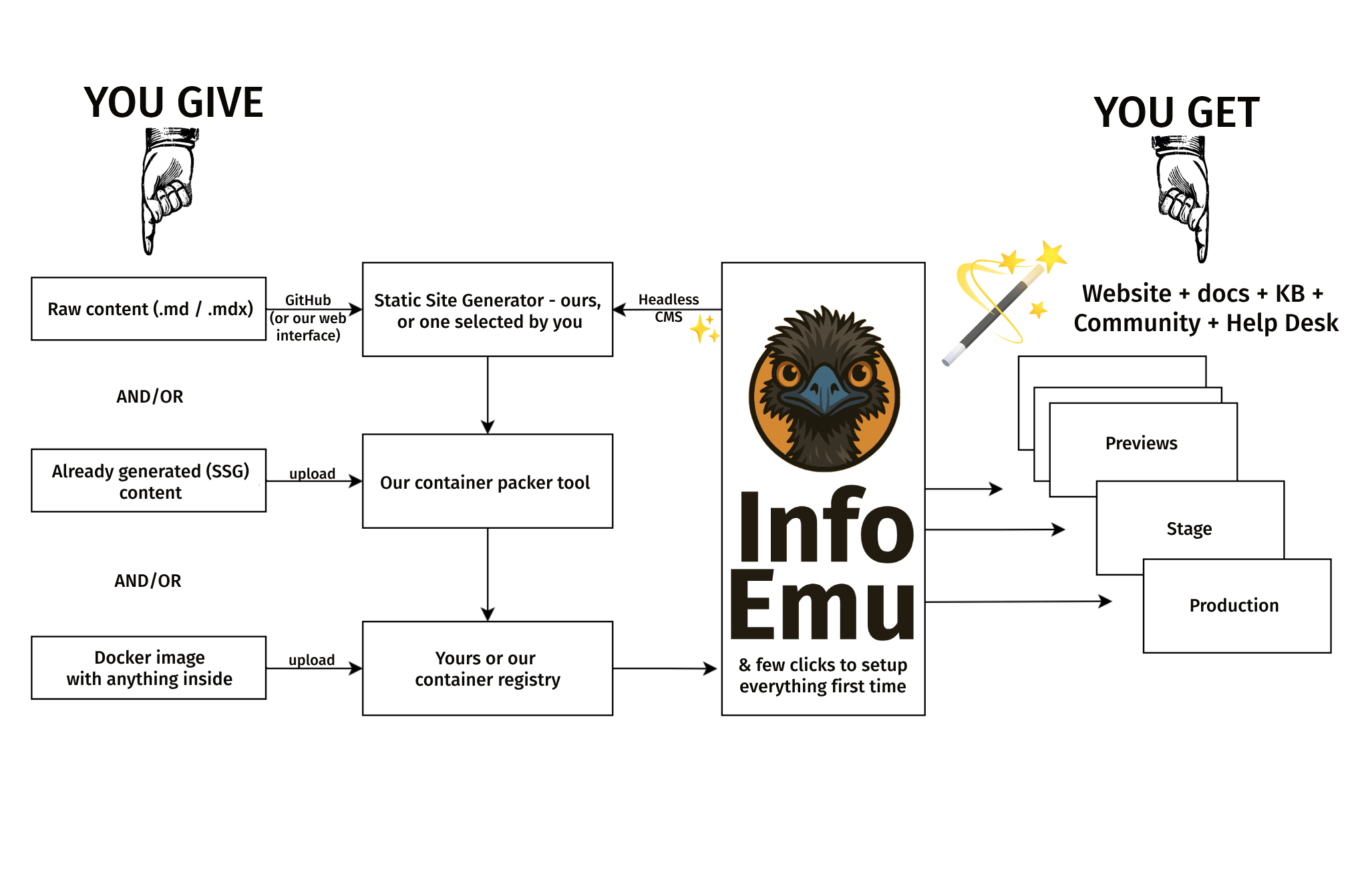
Don't want the agent building locally? Send raw Markdown instead: POST /api/deploy/{id}/source accepts a tar of content and our pinned builder
renders it in a sandbox — build logs come back through the API, and a failed
build never touches your live site. Or skip uploads entirely and connect a
GitHub repo (PUT /api/deploy/{id}/github): every push builds, non-default
branches become previews.
Beyond deploys
The same pattern covers the rest of the platform:
- Community: the forum is a REST API (
/api/forum/v1— topics, posts, threaded replies). An agent can seed launch-week discussion topics, or your product can post release notes automatically. With public read enabled, our@infoemu/reactcomponents render live threads on any page. - Docs & content: the headless CMS (
/api/cms/v1) takes API-key auth — agents can draft, review, and publish content entries, and the built-in AI drafting endpoint works with your own Anthropic key. - Support: the helpdesk API exposes tickets, replies, and triage. Email to your support address already becomes a ticket; an agent can summarize the queue every morning or draft replies for a human to send.
The paste-ready agent brief
Copy this into your agent's instructions (Claude Code users: drop it in
CLAUDE.md), fill the three placeholders, and put the token in the
environment:
## InfoEmu deployment

My site is hosted on InfoEmu (instance `<INSTANCE_ID>`, portal
`https://portal.infoemu.com`). The deploy token is in `$INFOEMU_DEPLOY_TOKEN` —
never print it.

- Deploy built output: POST /api/deploy/<INSTANCE_ID> with multipart field
  "archive" (tar.gz of the built site), Authorization: Bearer token.
- Raw Markdown instead: POST /api/deploy/<INSTANCE_ID>/source (we build it;
  check build logs at GET /api/deploy/<INSTANCE_ID>/builds).
- GET /api/deploy/<INSTANCE_ID>/releases lists releases, preview hostnames,
  and what's live. Every release has a preview URL — always check it.
- Rules: deploy freely; ALWAYS show me the preview URL before promoting;
  promote (POST .../promote) only after I approve; if I report a problem,
  rollback (POST .../rollback) first and investigate second.
That last line is the whole safety model in one sentence: deploys are cheap, previews are free, promotion needs a human, and rollback is the first response to trouble.
Prefer tools over curl? Use the MCP server
If your agent speaks MCP (Claude Code and Claude Desktop do), skip the raw
HTTP entirely: @infoemu/mcp exposes the whole platform as 23 typed tools
— deploy, releases and previews, promote/rollback, build logs, GitHub config,
plus forum, content, and help-desk operations. The safety model from this post
is built in: destructive tools (promote, rollback, production deploys) require
an explicit confirm flag, so a well-behaved agent asks you first by
construction. One line to wire it up:
claude mcp add infoemu -e INFOEMU_DEPLOY_URL=https://portal.infoemu.com \
  -e INFOEMU_INSTANCE_ID=<your-site> -e INFOEMU_DEPLOY_TOKEN=dpl_... \
  -- npx @infoemu/mcp
Machine-readable from the start
Agents shouldn't have to scrape marketing pages to learn a platform. We
publish /llms.txt — a plain-text map of what InfoEmu is and how
to drive it — and our product docs ship with the same content the agent brief
above is built from. Point your agent at it and get out of the way.
Building something agent-driven on InfoEmu? We'd genuinely like to hear about it: hi@infoemu.com.